When you send a request to MindRouter, whether it's a simple chat completion, an image analysis, or an embedding query, it kicks off a carefully orchestrated sequence of steps before a single token is generated. Behind the scenes, MindRouter authenticates your identity, translates your request into a universal format, applies fair-share scheduling to balance load across users, selects the optimal GPU backend, manages retries on failure, and tracks every token for quota enforcement.
This post walks through that entire journey in detail. Whether you're a developer building on our API, a researcher curious about the infrastructure, or an administrator tuning the cluster, understanding this pipeline will help you get the most out of MindRouter.
The Big Picture
Every request passes through these stages in order:
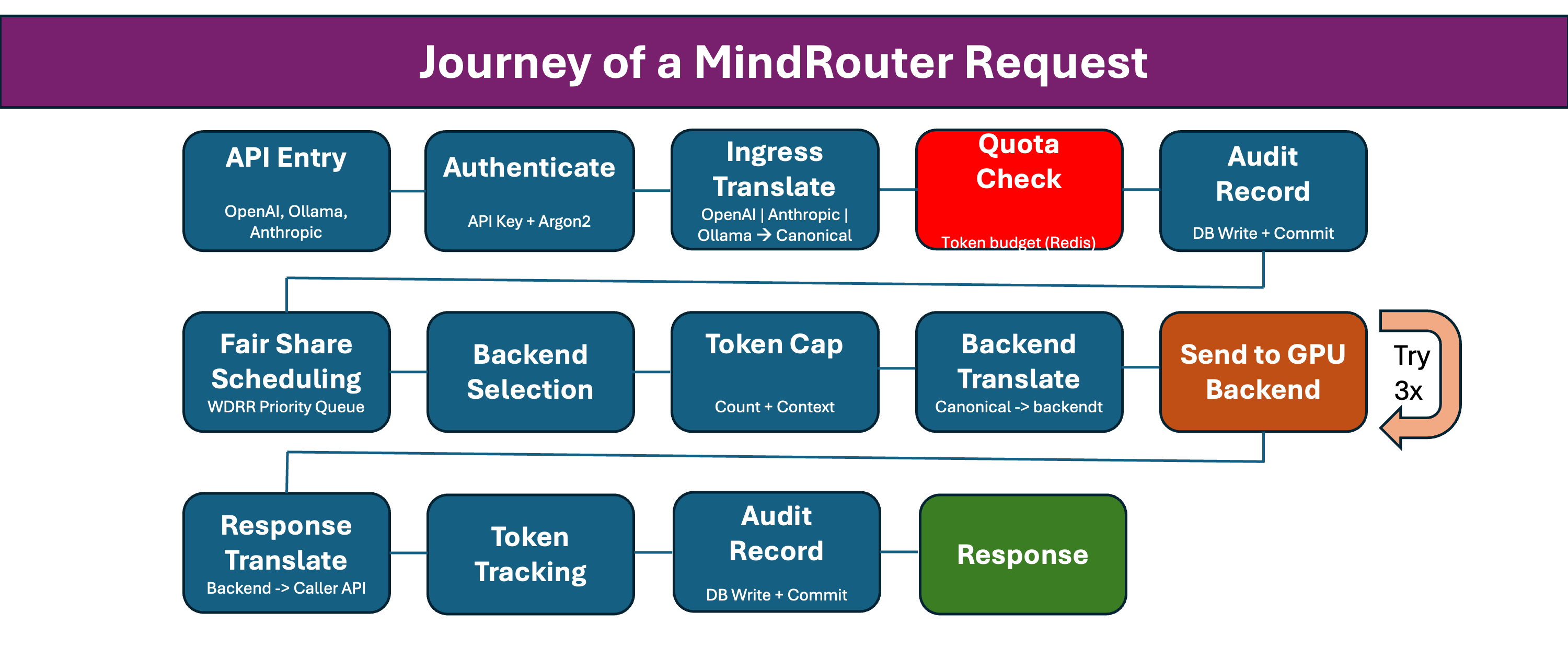
Let's walk through each step.
Step 1: API Entry Point
Every request enters through MindRouter's multi-format REST API. Unlike single-provider gateways, MindRouter natively accepts requests in three major API formats: OpenAI, Anthropic, and Ollama. This allows you to use whichever client library or SDK your team already knows:
| API Format | Endpoints | Who It's For |
|---|---|---|
| OpenAI | /v1/chat/completions, /v1/completions, /v1/embeddings, /v1/rerank | Teams using the OpenAI SDK, LangChain, or any OpenAI-compatible tool |
| Anthropic | /v1/messages | Teams using the Anthropic SDK or Claude-native workflows |
| Ollama | /api/chat, /api/generate, /api/embeddings | Teams running local Ollama clients or scripts |
You don't need to rewrite your application to switch providers. If you've been calling api.openai.com, just change the base URL to your MindRouter endpoint. If your team standardized on the Anthropic SDK, send requests in Anthropic's message format, and MindRouter will understand it natively. If you're migrating from a local Ollama setup to a shared GPU cluster, your existing Ollama client code works without modification.
All three formats are first-class citizens. They share the same authentication, scheduling, quota, and routing infrastructure. The only difference is the shape of the JSON on the way in and out. Under the hood, every request is translated into MindRouter's canonical intermediate representation (more on that in Step 3), so the backend GPUs never know which API format originated the request.
At this stage, MindRouter assigns a unique request_id (format: chatcmpl-{hex}) and binds it to the structured logging context. Every log line for this request will carry this ID, making debugging straightforward across the entire pipeline.
Step 2: Authentication
Before anything else, your API key is verified. MindRouter supports two authentication methods:
Authorization: Bearer mr2_...X-API-Key: mr2_...
The verification process is designed for both security and speed:
-
Prefix lookup: Extract the first 8 characters after
mr2_and look up matching keys in the database via an indexed column. This avoids expensive hash operations on every request. -
Hash verification: For the matched key, verify the full key using SHA-256 + Argon2 hashing. This is the same class of algorithm used for password storage. Even if the database is compromised, raw API keys cannot be recovered.
-
Status checks: Verify the key is ACTIVE, not revoked, has not expired, and that the owning user account is active.
If any check fails, you get a clear 401 Unauthorized response before any compute resources are consumed.
Step 3: Input Translation (Request --> Canonical)
MindRouter's secret weapon is its canonical intermediate representation. Instead of coupling the API format to any specific backend, every incoming request is first translated into an internal canonical format.
This is where the "translation layer" in MindRoutercomes from.
What gets translated:
-
Messages: Each message (system, user, assistant, tool) is converted to a canonical Message object. Multimodal content, such as images, is parsed into structured content blocks.
-
Parameters: max_completion_tokens takes priority over max_tokens, matching OpenAI's latest convention. Temperature, top_p, top_k, and repetition_penalty are all normalized.
-
Response format: JSON mode and JSON schema specifications are mapped to canonical equivalents.
-
Thinking mode: MindRouter accepts multiple thinking or reasoning formats and normalizes them all to a single canonical field.
-
Tool definitions: Function calling or tool use definitions are preserved in canonical form for models that support them.
This canonical format is the lingua franca of the system. Every downstream component, including the scheduler, backend translators, and audit logger, speaks canonical. Adding a new backend type would only require writing a single new output translator.
Step 4: Quota Check
Before burning any GPU cycles, MindRouter checks whether you're within your token budget.
Every user belongs to a group (students, faculty, researchers, etc.), and each group defines default quotas:
- Token budget: How many tokens you can use per billing period
- RPM limit: Maximum requests per minute
- Max concurrent: How many simultaneous requests you can have in flight
If your current period usage exceeds your group's token budget, you get a 429 Too Many Requests response. The quota counter lives in Redis for sub-millisecond checks and is synced to the database every 60 seconds for durability.
The period resets automatically based on your configured budget_period_days (default: 30 days). A separate lifetime_tokens_used counter tracks your all-time usage and is never reset, even when data retention purges old request records.
Step 5: Audit Record
Before the request enters the scheduling pipeline, MindRouter writes an audit record to the database with:
- User ID, API key ID, model name, endpoint
- Full message history, for debugging and compliance
- Client IP address and user agent
- Whether streaming was requested
- A UUID for cross-referencing in logs
Critical design choice: This database write is committed immediately and independently. It does not hold a transaction lock during the potentially long inference phase. This prevents database contention under high load and ensures the audit trail exists even if the inference step crashes.
Step 6: Fair-Share Scheduling
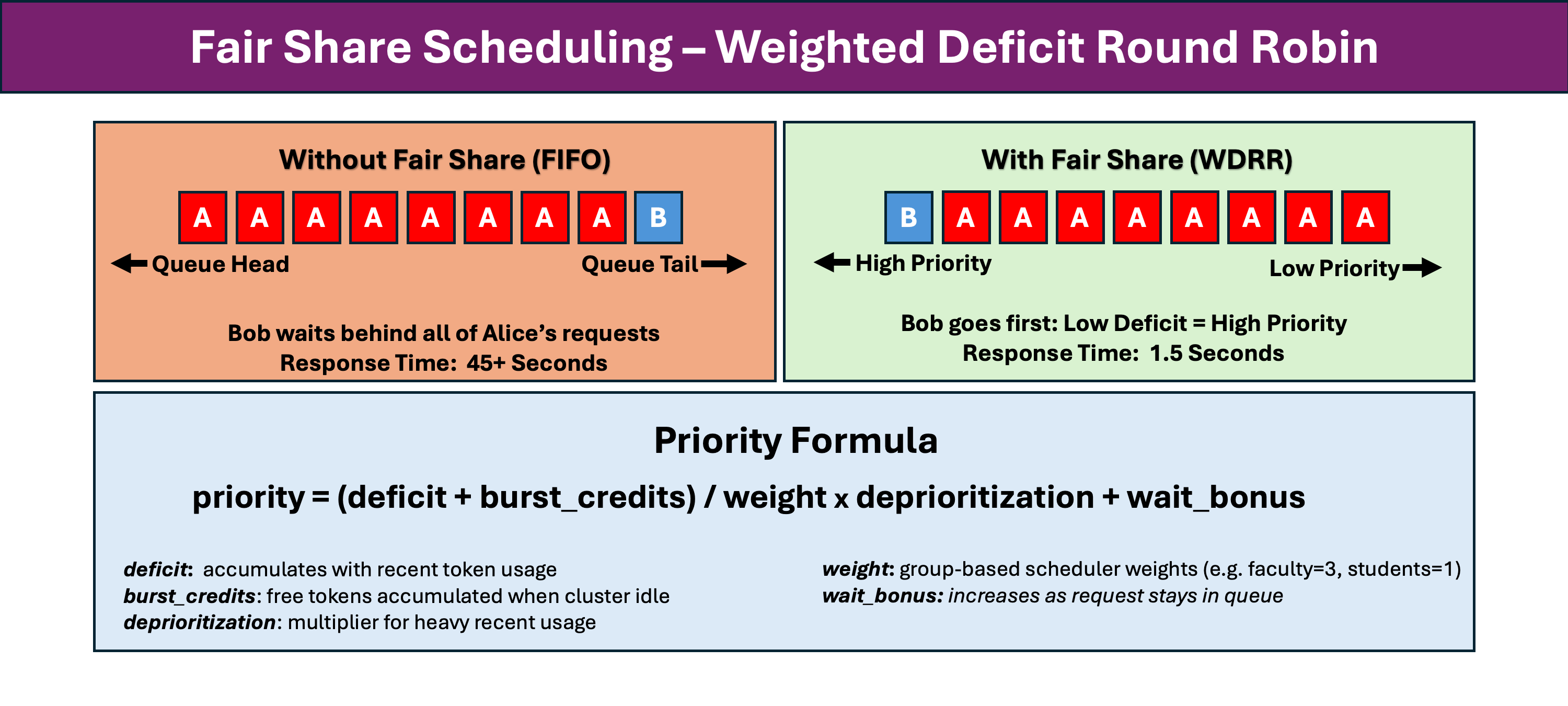
This is where MindRouter gets interesting. Instead of a simple FIFO queue, requests are scheduled using a Weighted Deficit Round Robin (WDRR) algorithm.
Why Fair-Share?
Imagine two users: Alice is running a batch job sending 50 requests per minute, and Bob just wants to ask one question. Without fair-share scheduling, Bob's single request would sit behind Alice's 50. With WDRR, Bob gets served quickly because he has not used much recent capacity.
How It Works
Each user has a deficit counter that tracks their recent consumption. The priority formula balances multiple factors:
- Deficit: Accumulates as you use tokens. Heavy recent users have high deficit, which means lower priority.
- Burst credits: When the cluster is idle, everyone accumulates credits that allow free consumption without penalty.
- Weight: Comes from your group's scheduler_weight. Faculty (weight=3) get 3 times the throughput share of students (weight=1) under contention.
- Wait bonus: Anti-starvation mechanism. The longer your request waits, the higher its priority climbs. No request waits forever.
The Job Object
At this stage, MindRouter creates a Job with estimated prompt and completion token counts (using tiktoken), modality classification (chat, multimodal, embedding), and the computed WDRR priority score. The job enters a global priority queue, a per-user queue, and a per-model queue.
Step 7: Backend Selection (The Scoring Engine)
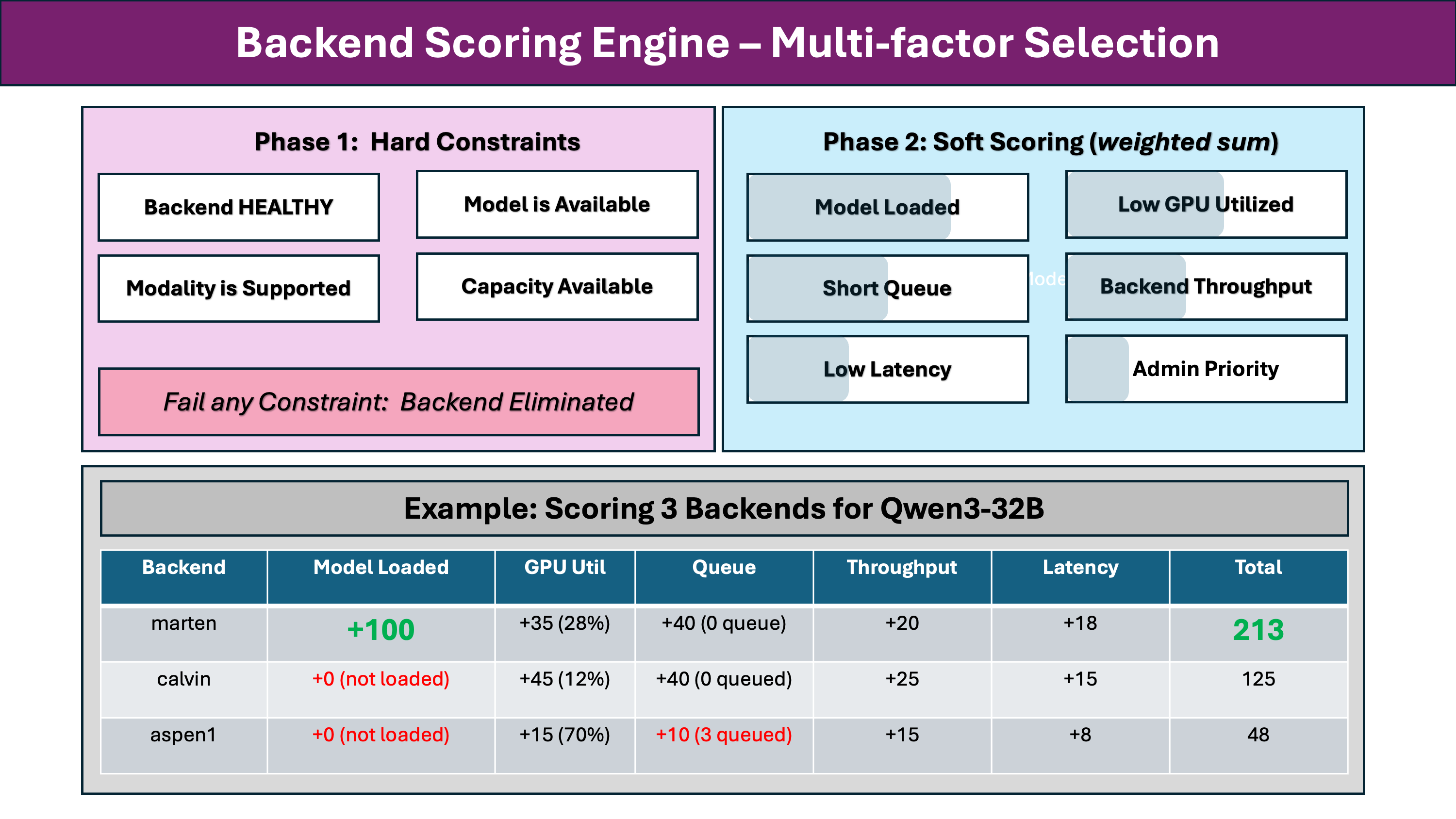
With the job queued, MindRouter needs to pick the best GPU backend from potentially dozens of candidates across the cluster. This is a two-phase process.
Phase 1: Hard Constraints
Every backend is checked against non-negotiable requirements. If any requirement fails, the backend is eliminated:
- Health: Backend status must be HEALTHY, meaning a recent successful health check
- Model available: The requested model must be loaded or available on this backend
- Modality support: Vision models for image requests, embedding models for embeddings
- Structured output: Backend must support JSON schema if the request requires it
- Capacity: Current load plus queue depth must be below max_concurrent
Phase 2: Soft Scoring
Eligible backends are scored on multiple weighted factors. The model loaded bonus is by far the largest factor, approximately 100 points. If a model is already resident in GPU memory on a backend, that backend wins almost every time. Loading a model from disk can take 30 to 60 seconds, while inference on a loaded model starts immediately.
Other factors create tiebreakers. The system prefers GPUs that are less busy, have shorter queues, use faster hardware (H200 > A100 > RTX 8000), have lower recent latency, tracked as an exponential moving average, and have higher admin-configured priority.
Waiting for Capacity
If no backend has capacity right now, the request does not fail immediately. Instead, MindRouter enters a capacity wait loop:
- Register as a waiter for the requested model
- Wait up to 150 seconds for a slot to open
- Recompute priority periodically, since your priority improves as you wait
- Apply a priority gate so that only the highest-priority waiter for a model gets the next available slot
This prevents thundering herd problems. When a slot opens, all waiters do not rush in simultaneously. Only the one that deserves it most, based on fair-share, proceeds.
Step 8: Token Counting and Context Capping
Before sending to the backend, MindRouter counts your input tokens precisely and caps the output to prevent context overflows.
For vLLM backends: We call the backend's /tokenize endpoint directly. This gives an authoritative token count that includes chat template overhead, tool definitions, and special tokens.
For Ollama backends: We use tiktoken as a best-effort estimate, adding overhead per message for role markers and separators.
Context capping is critical for stability:
remaining = context_length - input_tokens - 1024 (safety buffer)
max_tokens = min(requested_max, remaining, 65536)
This prevents users from requesting more output tokens than the model's context window can hold. On some models, exceeding this limit would cause an out-of-memory crash on the GPU, affecting all users on that backend.
Step 9: Output Translation (Canonical to Backend)
Now the canonical request is translated into the backend's native format. Each backend speaks its own dialect, and MindRouter handles the differences transparently.
For vLLM:
- Most parameters map directly, including temperature, top_p, and max_tokens
- Thinking mode is mapped appropriately depending on format
- Tool definitions pass through as-is
- Structured output formats may need promotion
For Ollama:
- Sampling parameters go into a nested options dictionary
- max_tokens becomes num_predict
- num_ctx is injected from the model's configured context length
format: "json"is used for JSON modethink: true/falseis set at the top level
This allows a single OpenAI-format request to work across multiple backends without modification.
Step 10: Backend Request with Retry
The translated request is sent to the selected GPU backend with automatic retry and failover.
Retry Strategy
- Up to 3 attempts, configurable
- Each attempt targets a different backend
- Timeout per attempt is 180 seconds
What's Retryable?
| Error Type | Retryable? | Action |
|---|---|---|
| Timeout | Yes | Try different backend |
| Connection error | Yes | Try different backend |
| 5xx Server Error | Yes | Try different backend |
| 4xx Client Error | No | Return error immediately |
Circuit Breaker
Backend failures feed into a circuit breaker. After a threshold number of consecutive failures, the backend enters a cooldown period. It will not receive new requests during that time. A single successful request resets the failure counter.
Step 11: Response Translation
The backend's response is translated back into the canonical internal format, then converted to match the API the client originally called: OpenAI format for /v1/ endpoints, Ollama format for /api/ endpoints, and Anthropic format for /anthropic/v1 endpoints. This happens regardless of which backend engine actually generated it.
Step 12: Token Tracking and Request Completion
After the response is sent to the client, MindRouter records the results in a carefully ordered sequence:
- Release backend capacity immediately
- Mark model as loaded
- Update audit record
- Update quota
- Update Redis
All post-inference database operations run inside asyncio.shield() to prevent mid-transaction cancellation.
Streaming: The Parallel Path
For streaming responses, the flow is similar but includes:
- Server-Sent Events for real-time token streaming
- Progressive token estimation
- Graceful handling of client disconnects
- Final completion signal via
data: [DONE]
When Things Go Wrong
MindRouter handles failures at every level with appropriate responses:
| Failure Point | HTTP Status | What Happens |
|---|---|---|
| Invalid API key | 401 | Rejected immediately |
| Quota exceeded | 429 | Rejected before scheduling |
| Model not found | 404 | Checked before queuing |
| No capacity (temporary) | -- | Wait with priority gating |
| No capacity (permanent) | 503 | Service Unavailable |
| Backend errors | -- | Retry up to 3 times |
| All backends failed | 502 | Return last error |
| Client disconnect | -- | Graceful cleanup |
Performance Design Highlights
- Sub-millisecond quota checks using Redis
- Early model validation
- Immediate audit commit
- In-memory queue depth tracking
- Priority gating
- Parallel metadata loading
Conclusion
What looks like a simple API call, send a prompt and get a response, involves authentication, translation, fair-share scheduling, backend scoring, capacity management, retry logic, response translation, and token tracking. Each step is designed for correctness, fairness, and performance.
The next time your request comes back in 200 milliseconds, you'll know it passed through all 12 steps in that time. And the next time it takes a few seconds, you'll know it was waiting its fair turn in the scheduler while the cluster balanced load across dozens of GPUs.
MindRouter handles the complexity so your code doesn't have to.