
Introduction
Writing code that talks to an API might seem straightforward at first. Send a request, get a response, move on. But in the real world, things don’t always go that smoothly: networks hiccup, servers get busy, and requests occasionally fail for reasons outside your control. Building resilient, robust client code is about handling those moments gracefully so your application keeps working instead of breaking at the first sign of trouble. It’s not rocket science. You don’t need deep systems expertise, but it does take some thoughtful design and a few proven patterns. The payoff is huge: software that feels reliable, responsive, and trustworthy, even when the systems behind it are under stress.
MindRouter exposes OpenAI-compatible /v1 endpoints, which means you can use the standard OpenAI Python SDK, but writing robust client code for a self-hosted cluster requires understanding behaviors that differ from calling OpenAI's cloud API directly.
This guide covers every /v1 endpoint, every HTTP status code you might encounter, and well-tested patterns for retries, concurrency, streaming, rate limiting, and error handling. All examples use the official OpenAI Python SDK and are tested against MindRouter v2.4.0+.
Pro Tip:
If you are using Agentic Coding assistants (e.g. Claude Code, Codex, Forge Code, etc.), simply point them to this this Blog post to give them an instant head start to make resilient MindRouter client code!
Code:
All code in this blog post has been extracted into stand-alone, instructional Python scripts and tested against MindRouter! You can find those scripts here.
Table of Contents
- Getting Started
- Available Endpoints
- Authentication
- HTTP Status Codes Reference
- Chat Completions
- Streaming Responses
- Embeddings
- Reranking and Scoring
- Image Generation
- Voice: Text-to-Speech and Transcription
- Model Discovery
- Tokenization
- Error Handling
- Retry Strategies and Exponential Backoff
- Rate Limits and RPM Quotas
- Concurrency and Adaptive Throttling
- Timeouts and Connection Configuration
- Circuit Breakers
- Structured Output and JSON Mode
- Thinking and Reasoning Mode
- Tool Calling / Function Calling
- Summary of Best Practices
- Conclusion and Challenge
Getting Started
Install the OpenAI Python SDK:
pip install openai
Point it at your MindRouter instance by setting base_url:
from openai import OpenAI

client = OpenAI(
    base_url="https://mindrouter.example.com/v1",
    api_key="mr2_your_api_key_here",
)
Or use environment variables (no code changes needed):
export OPENAI_BASE_URL="https://mindrouter.example.com/v1"
export OPENAI_API_KEY="mr2_your_api_key_here"
from openai import OpenAI
client = OpenAI()  # picks up env vars automatically
That's It!!
Every standard OpenAI SDK call now routes through MindRouter, which handles backend selection, load balancing, failover, and fair-share scheduling transparently. On the client side, the OpenAI SDK also gives you a solid foundation out of the box: it manages HTTP connections efficiently with connection pooling, handles request serialization and response parsing, supports streaming via Server-Sent Events, and provides a structured exception hierarchy that maps cleanly to HTTP status codes. It also includes basic retry behavior with exponential backoff, timeout controls, and both synchronous and asynchronous interfaces, so you can scale from simple scripts to high-concurrency applications without changing libraries.
With the OpenAI SDK in place, you have a clean and powerful entry point into MindRouter. The rest of this guide builds on that foundation, diving into the deeper patterns and techniques that let you directly control concurrency, manage retries and rate limits, reduce latency, optimize token usage, and handle failures gracefully, turning simple API calls into resilient, high-performance client systems.
Available Endpoints
MindRouter exposes the following /v1 endpoints:
| Endpoint | Method | Description |
|---|---|---|
/v1/chat/completions |
POST | Chat completions (streaming and non-streaming) |
/v1/completions |
POST | Legacy text completions |
/v1/embeddings |
POST | Text embeddings |
/v1/rerank |
POST | Document reranking (vLLM backends only) |
/v1/score |
POST | Text similarity scoring (vLLM backends only) |
/v1/images/generations |
POST | Image generation (FLUX and other diffusion models) |
/v1/audio/speech |
POST | Text-to-speech |
/v1/audio/transcriptions |
POST | Speech-to-text transcription |
/v1/models |
GET | List available models |
/v1/tokenize |
POST | Count tokens for a request |
/v1/ocr |
POST | OCR via multimodal LLM (returns JSON) |
/v1/ocrmd |
POST | OCR via multimodal LLM (returns Markdown) |
Authentication

MindRouter accepts API keys via two methods:
# Method 1: Authorization header (used automatically by the SDK)
# Authorization: Bearer mr2_your_api_key_here
client = OpenAI(
    base_url="https://mindrouter.example.com/v1",
    api_key="mr2_your_api_key_here",
)

# Method 2: X-API-Key header (for custom HTTP clients)
import httpx
response = httpx.post(
    "https://mindrouter.example.com/v1/chat/completions",
    headers={"X-API-Key": "mr2_your_api_key_here"},
    json={...},
)
API keys can have per-key RPM (requests per minute) limits and are associated with a user who belongs to a group with a token budget. Keys have a status (ACTIVE, REVOKED, EXPIRED, SUSPENDED) and an optional expiration date.
HTTP Status Codes Reference

Every response from MindRouter returns one of the following HTTP status codes. Understanding these is critical for writing resilient client code.
Success
| Code | Meaning | When You'll See It |
|---|---|---|
200 OK |
Request completed successfully | All non-streaming endpoints return 200 with the result JSON. Streaming endpoints also return 200 with Content-Type: text/event-stream. |
Client Errors (Do NOT Retry)
| Code | Meaning | Example Response | Common Causes |
|---|---|---|---|
400 Bad Request |
The request is malformed or invalid | {"detail": "Invalid request format: 'messages' field is required"} |
Missing required fields, invalid JSON body, requesting multimodal on a text-only model, invalid response_format |
401 Unauthorized |
Authentication failed | {"detail": "Invalid API key"} |
Missing/invalid/expired/revoked API key, inactive user account |
403 Forbidden |
Authenticated but not permitted | {"detail": "Image generation not enabled for your account"} |
Feature not enabled for user, content policy violation on image generation |
404 Not Found |
The requested model does not exist | {"error": {"message": "The model 'nonexistent-model' does not exist", "type": "invalid_request_error", "code": "model_not_found"}} |
Typo in model name, model not loaded on any backend |
413 Payload Too Large |
Upload exceeds size limit | {"detail": "File exceeds maximum size of 50MB"} |
OCR file too large |
422 Unprocessable Entity |
Valid request but cannot produce output | {"detail": "Structured output was requested but the model's reasoning consumed the entire token budget..."} |
Structured output + thinking mode token conflict |
Rate Limiting (Retry with Backoff)
| Code | Meaning | Example Response | What To Do |
|---|---|---|---|
429 Too Many Requests |
Rate limit or quota exceeded | {"detail": "Rate limit exceeded: 60 requests per minute (current: 61)"} |
Implement exponential backoff. See Rate Limits. |
429 Too Many Requests |
Token quota exhausted | {"detail": "Token quota exceeded"} |
Wait for quota period reset (daily/monthly). Reduce usage or request a quota increase. |
Server Errors (Retry with Backoff)
| Code | Meaning | Example Response | What To Do |
|---|---|---|---|
502 Bad Gateway |
All backend attempts failed | {"detail": "All 3 backend attempts failed. Last error: Backend returned 500"} |
MindRouter already retried internally (up to 3 attempts across different backends). Retry with backoff, but this indicates a systemic issue. |
503 Service Unavailable |
No capacity or no backends | {"detail": "No backend capacity available (waited 150s)"} |
All backends are at max concurrency. Retry with backoff; consider reducing your concurrency. |
503 Service Unavailable |
No healthy backends | {"detail": "No healthy backends available"} |
All backends are down or circuit-broken. Retry after a delay. |
503 Service Unavailable |
Capability mismatch | {"detail": "No suitable backend: model_not_available"} |
The model exists but all backends serving it are unhealthy. |
Key Insight: MindRouter Retries Internally
When a backend fails with a 5xx error or timeout, MindRouter automatically retries on a different backend (up to 3 attempts). By the time you receive a 502, MindRouter has already exhausted its retry budget. A client-side retry may still succeed if the issue was transient across the cluster, but repeated 502s suggest a deeper problem.
Note on Retry-After Headers
MindRouter does not return Retry-After headers on 429 or 503 responses. Clients should implement their own exponential backoff strategy (covered below).
Chat Completions

The primary endpoint for text generation:
response = client.chat.completions.create(
    model="openai/gpt-oss-120b",
    messages=[
        {"role": "system", "content": "You are a helpful assistant."},
        {"role": "user", "content": "Explain quantum entanglement in simple terms."},
    ],
    max_tokens=1024,
    temperature=0.7,
)

print(response.choices[0].message.content)
print(f"Tokens used: {response.usage.total_tokens}")
Response format
{
  "id": "chatcmpl-a1b2c3d4e5f6...",
  "object": "chat.completion",
  "created": 1713400000,
  "model": "openai/gpt-oss-120b",
  "choices": [
    {
      "index": 0,
      "message": {
        "role": "assistant",
        "content": "Quantum entanglement is..."
      },
      "finish_reason": "stop"
    }
  ],
  "usage": {
    "prompt_tokens": 28,
    "completion_tokens": 150,
    "total_tokens": 178
  }
}
Finish reasons
finish_reason |
Meaning |
|---|---|
"stop" |
Model finished naturally or hit a stop sequence |
"length" |
Hit max_tokens limit — response is truncated |
"tool_calls" |
Model wants to call one or more tools |
Always check finish_reason. If it's "length", the response is incomplete and you may want to continue the conversation or increase max_tokens.
Streaming Responses
Streaming is essential for interactive applications — the user sees tokens as they're generated rather than waiting for the complete response:
stream = client.chat.completions.create(
    model="openai/gpt-oss-120b",
    messages=[{"role": "user", "content": "Write a short story about a robot."}],
    stream=True,
    max_tokens=2048,
)

full_response = ""
for chunk in stream:
    delta = chunk.choices[0].delta.content
    if delta is not None:
        print(delta, end="", flush=True)
        full_response += delta
print()  # newline after stream completes
Async streaming
Click to expand
from openai import AsyncOpenAI

async_client = AsyncOpenAI(
    base_url="https://mindrouter.example.com/v1",
    api_key="mr2_your_api_key_here",
)

async def stream_chat(prompt: str) -> str:
    stream = await async_client.chat.completions.create(
        model="openai/gpt-oss-120b",
        messages=[{"role": "user", "content": prompt}],
        stream=True,
    )

    full_response = ""
    async for chunk in stream:
        delta = chunk.choices[0].delta.content
        if delta:
            full_response += delta
            print(delta, end="", flush=True)

    return full_response
Streaming error handling
Errors can occur at two points during streaming:
-
Before the first chunk — MindRouter returns the error as an SSE event:
data: {"error": {"message": "Backend returned 500", "type": "backend_error", "code": 500}}
   data: [DONE]
The SDK raises an exception in this case. -
Mid-stream — The stream terminates abruptly without a
[DONE]signal. The SDK raises anAPIConnectionError. You must handle this gracefully.
Click to expand
import openai

async def stream_with_recovery(messages: list, max_retries: int = 3) -> str:
    """Stream a response with retry on mid-stream disconnect."""
    for attempt in range(max_retries):
        collected = ""
        try:
            stream = await async_client.chat.completions.create(
                model="openai/gpt-oss-120b",
                messages=messages,
                stream=True,
            )
            async for chunk in stream:
                delta = chunk.choices[0].delta.content
                if delta:
                    collected += delta
                    yield delta
            return  # stream completed successfully

        except (openai.APIConnectionError, openai.APITimeoutError):
            if attempt == max_retries - 1:
                raise
            # Append partial response and ask model to continue
            if collected:
                messages = messages + [
                    {"role": "assistant", "content": collected},
                    {"role": "user", "content": "Continue from where you left off."},
                ]
            await asyncio.sleep(2 ** attempt)  # backoff before retry
Streaming best practices
- Always set a read timeout — A stalled backend can leave a stream hanging indefinitely.
- Accumulate the full response — You'll want it for logging, storage, or retry context.
- MindRouter retries internally before streaming starts — If MindRouter can't reach any backend, you get a clean error. Once streaming begins, MindRouter cannot retry (the HTTP response has already started).
Embeddings
Generate vector embeddings for semantic search, clustering, and RAG pipelines:
response = client.embeddings.create(
    model="Qwen/Qwen3-Embedding-8B",
    input="The quick brown fox jumps over the lazy dog",
)

embedding = response.data[0].embedding
print(f"Dimensions: {len(embedding)}")
print(f"Tokens used: {response.usage.total_tokens}")
Batch embeddings
Click to expand
texts = [
    "Machine learning is a subset of artificial intelligence.",
    "Deep learning uses neural networks with many layers.",
    "Natural language processing handles human language.",
]

response = client.embeddings.create(
    model="Qwen/Qwen3-Embedding-8B",
    input=texts,
)

for i, item in enumerate(response.data):
    print(f"Text {i}: {len(item.embedding)} dimensions")
Embedding response format
Click to expand
{
  "object": "list",
  "data": [
    {
      "object": "embedding",
      "index": 0,
      "embedding": [0.0123, -0.0456, 0.0789, ...]
    }
  ],
  "model": "Qwen/Qwen3-Embedding-8B",
  "usage": {
    "prompt_tokens": 10,
    "total_tokens": 10
  }
}
Reranking and Scoring
MindRouter exposes vLLM's reranking and scoring capabilities for RAG pipelines. These endpoints are only available on vLLM backends.
Reranking
Rerank a set of documents against a query to improve retrieval relevance:
Click to expand
import httpx

# The OpenAI SDK doesn't have a built-in rerank method,
# so use httpx directly
response = httpx.post(
    "https://mindrouter.example.com/v1/rerank",
    headers={"Authorization": "Bearer mr2_your_api_key_here"},
    json={
        "model": "Qwen/Qwen3-Reranker-8B",
        "query": "What is the capital of France?",
        "documents": [
            "Paris is the capital and most populous city of France.",
            "Berlin is the capital of Germany.",
            "The Eiffel Tower is located in Paris.",
            "London is the capital of England.",
        ],
        "top_n": 3,
        "return_documents": True,
    },
    timeout=60.0,
)

results = response.json()
for result in results["results"]:
    print(f"Score: {result['relevance_score']:.4f} — {result['document'][:60]}...")
Scoring
Score similarity between text pairs:
Click to expand
response = httpx.post(
    "https://mindrouter.example.com/v1/score",
    headers={"Authorization": "Bearer mr2_your_api_key_here"},
    json={
        "model": "Qwen/Qwen3-Reranker-8B",
        "text_1": "What is machine learning?",
        "text_2": [
            "Machine learning is a branch of AI that learns from data.",
            "The weather today is sunny and warm.",
        ],
    },
    timeout=60.0,
)
Note: Both /v1/rerank and /v1/score return 400 Bad Request if the selected model routes to an Ollama backend, as these features require vLLM.
Image Generation
Generate images using FLUX and other diffusion models:
response = client.images.generate(
    model="black-forest-labs/FLUX.2-dev",
    prompt="A serene mountain landscape at sunset, photorealistic",
    size="1024x1024",
    n=1,
)

image_url = response.data[0].url  # or .b64_json if requested
print(f"Image URL: {image_url}")
Image generation specifics
- Content policy: MindRouter runs an LLM-as-judge content filter on all image prompts. Prompts that violate the content policy return
403 Forbidden. - User permission: Image generation must be enabled for your account. If not, you'll receive
403 Forbidden. - Longer timeouts: Image generation can take 10-30 seconds depending on model and size. Set your client timeout accordingly.
- Allowed sizes: The administrator configures allowed image dimensions. Invalid sizes return
400 Bad Request.
Click to expand
# Handle image generation with appropriate timeout
import httpx

client = OpenAI(
    base_url="https://mindrouter.example.com/v1",
    api_key="mr2_your_api_key_here",
    timeout=httpx.Timeout(300.0, connect=5.0),  # 5 min for slow diffusion
)

try:
    response = client.images.generate(
        model="black-forest-labs/FLUX.2-dev",
        prompt="A robot painting a landscape",
        size="1024x1024",
    )
except openai.PermissionDeniedError as e:
    # 403: content policy violation or feature not enabled
    print(f"Denied: {e.message}")
except openai.BadRequestError as e:
    # 400: invalid size, missing prompt, etc.
    print(f"Bad request: {e.message}")
Voice: Text-to-Speech and Transcription
Text-to-Speech (TTS)
response = client.audio.speech.create(
    model="tts-1",
    voice="alloy",
    input="Hello! This is MindRouter speaking.",
)

# Save to file
response.stream_to_file("output.mp3")
Speech-to-Text (STT)
with open("recording.mp3", "rb") as audio_file:
    transcript = client.audio.transcriptions.create(
        model="whisper-1",
        file=audio_file,
    )

print(transcript.text)
Note: Voice endpoints must be enabled by the MindRouter administrator. If disabled, you'll receive 404 Not Found.
Model Discovery

List all models available across healthy backends:
models = client.models.list()

for model in models.data:
    print(f"{model.id}")
Extended model metadata
MindRouter extends the standard OpenAI model response with additional fields:
Click to expand
{
  "object": "list",
  "data": [
    {
      "id": "openai/gpt-oss-120b",
      "object": "model",
      "created": 1713400000,
      "owned_by": "mindrouter",
      "capabilities": {
        "multimodal": false,
        "embeddings": false,
        "structured_output": true,
        "thinking": true,
        "tools": true
      },
      "backends": ["aspen1-gpu1", "aspen3-gpu1"],
      "context_length": 131072,
      "model_max_context": 131072,
      "parameter_count": "120B",
      "quantization": null,
      "family": "gpt"
    }
  ]
}
Use this to discover capabilities before making requests — for example, check capabilities.multimodal before sending image inputs, or check capabilities.thinking before enabling reasoning mode.
Tokenization
Count tokens before making a request — useful for quota management and prompt engineering:
import httpx

response = httpx.post(
    "https://mindrouter.example.com/v1/tokenize",
    headers={"Authorization": "Bearer mr2_your_api_key_here"},
    json={
        "model": "openai/gpt-oss-120b",
        "messages": [
            {"role": "system", "content": "You are helpful."},
            {"role": "user", "content": "Count my tokens."},
        ],
    },
)

data = response.json()
print(f"Input tokens: {data['count']}")
print(f"Model max length: {data['max_model_len']}")
print(f"Estimated: {data['is_estimate']}")
When the backend supports exact tokenization (vLLM), is_estimate is false. For Ollama backends, MindRouter uses tiktoken as a fallback and is_estimate will be true.
Error Handling
The OpenAI SDK maps HTTP status codes to a typed exception hierarchy. Use this to distinguish retryable from non-retryable errors:
import openai

# Exception hierarchy:
#
# openai.APIError (base)
#   openai.APIStatusError
#     openai.BadRequestError          → 400  (do NOT retry)
#     openai.AuthenticationError      → 401  (do NOT retry)
#     openai.PermissionDeniedError    → 403  (do NOT retry)
#     openai.NotFoundError            → 404  (do NOT retry)
#     openai.UnprocessableEntityError → 422  (do NOT retry)
#     openai.RateLimitError           → 429  (RETRY with backoff)
#     openai.InternalServerError      → 5xx  (RETRY with backoff)
#   openai.APIConnectionError               (RETRY with backoff)
#   openai.APITimeoutError                  (RETRY with backoff)
Comprehensive error handler
Click to expand
import openai
import logging

logger = logging.getLogger(__name__)

# Errors worth Treing
RETRYABLE_ERRORS = (
    openai.RateLimitError,       # 429
    openai.APITimeoutError,      # timeout
    openai.APIConnectionError,   # network
    openai.InternalServerError,  # 500/502/503/504
)

# Errors that will never succeed on retry
FATAL_ERRORS = (
    openai.BadRequestError,          # 400
    openai.AuthenticationError,      # 401
    openai.PermissionDeniedError,    # 403
    openai.NotFoundError,            # 404
    openai.UnprocessableEntityError, # 422
)

def call_with_error_handling(func, *args, **kwargs):
    """Call an OpenAI SDK method with proper error classification."""
    try:
        return func(*args, **kwargs)
    except FATAL_ERRORS as e:
        logger.error(f"Non-retryable error ({e.status_code}): {e.message}")
        raise  # don't retry — fix the request
    except openai.RateLimitError as e:
        logger.warning(f"Rate limited: {e.message}")
        raise  # caller should implement backoff
    except openai.InternalServerError as e:
        logger.warning(f"Server error ({e.status_code}): {e.message}")
        raise  # caller should retry with backoff
    except (openai.APIConnectionError, openai.APITimeoutError) as e:
        logger.warning(f"Connection issue: {e}")
        raise  # caller should retry with backoff
Reading error details
MindRouter returns errors in two formats. The SDK parses both:
try:
    response = client.chat.completions.create(
        model="nonexistent-model",
        messages=[{"role": "user", "content": "hello"}],
    )
except openai.NotFoundError as e:
    print(f"Status: {e.status_code}")    # 404
    print(f"Message: {e.message}")       # "The model 'nonexistent-model' does not exist"
    print(f"Body: {e.body}")             # full error dict

    # MindRouter 404 body format:
    # {"error": {"message": "...", "type": "invalid_request_error", "code": "model_not_found"}}
Retry Strategies and Exponential Backoff
Level 1: SDK built-in retries (simplest)
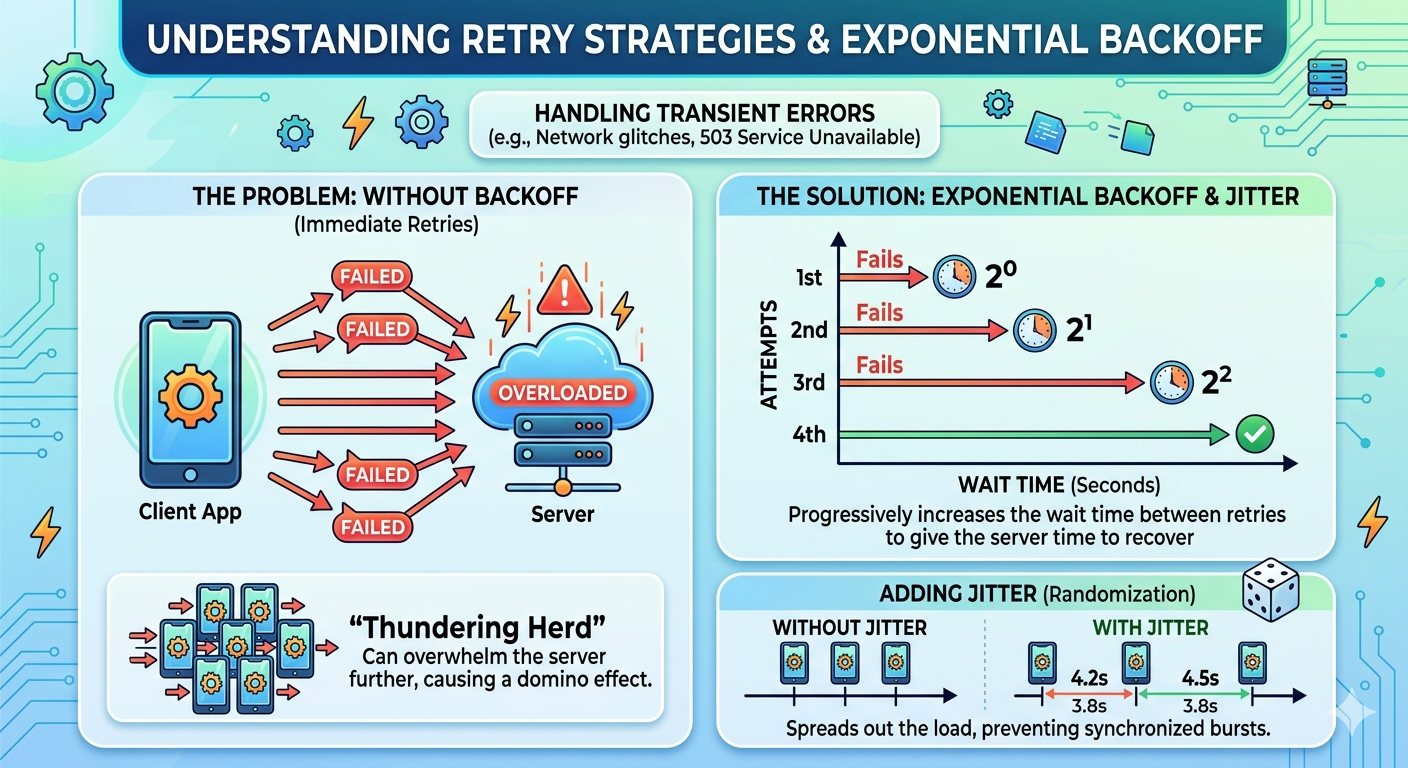
The OpenAI SDK retries automatically on 429, 5xx, timeouts, and connection errors. The default is 2 retries with exponential backoff (0.5s initial, 8s max, randomized jitter):
# Increase retry count from the default of 2
client = OpenAI(
    base_url="https://mindrouter.example.com/v1",
    api_key="mr2_your_api_key_here",
    max_retries=5,
)

# Or override per-request
response = client.with_options(max_retries=8).chat.completions.create(
    model="openai/gpt-oss-120b",
    messages=[{"role": "user", "content": "hello"}],
)
For many use cases, this is sufficient. The SDK handles jitter, backoff, and error classification for you.
Level 2: Tenacity (more control)
When you need custom retry logic such as different backoff curves, retry-on-specific-errors, or logging between retries, use the tenacity Python library:
Click to expand
pip install tenacity
import openai
from tenacity import (
    retry,
    stop_after_attempt,
    wait_random_exponential,
    retry_if_exception_type,
    before_sleep_log,
)
import logging

logger = logging.getLogger(__name__)

@retry(
    wait=wait_random_exponential(min=1, max=60),
    stop=stop_after_attempt(6),
    retry=retry_if_exception_type((
        openai.RateLimitError,
        openai.APITimeoutError,
        openai.APIConnectionError,
        openai.InternalServerError,
    )),
    before_sleep=before_sleep_log(logger, logging.WARNING),
)
def resilient_chat(client, **kwargs):
    """Chat completion with tenacity-managed retries."""
    return client.chat.completions.create(**kwargs)

# Usage
response = resilient_chat(
    client,
    model="openai/gpt-oss-120b",
    messages=[{"role": "user", "content": "hello"}],
)
Level 3: Manual exponential backoff with jitter
For full control, especially when you need to adapt behavior based on the specific error:
Click to expand
import random
import time
import openai

def chat_with_backoff(
    client: OpenAI,
    messages: list,
    model: str = "openai/gpt-oss-120b",
    max_retries: int = 6,
    initial_delay: float = 1.0,
    max_delay: float = 60.0,
    backoff_factor: float = 2.0,
) -> openai.types.chat.ChatCompletion:
    """
    Chat completion with exponential backoff and full jitter.

    Jitter prevents the "thundering herd" problem where many clients
    retry simultaneously after a shared failure, overwhelming the server.
    """
    delay = initial_delay

    for attempt in range(max_retries + 1):
        try:
            return client.chat.completions.create(
                model=model,
                messages=messages,
            )
        except openai.RateLimitError as e:
            if attempt == max_retries:
                raise
            # Full jitter: uniform random between 0 and calculated delay
            jittered_delay = random.uniform(0, delay)
            print(f"Rate limited (attempt {attempt + 1}/{max_retries + 1}). "
                  f"Waiting {jittered_delay:.1f}s...")
            time.sleep(jittered_delay)
            delay = min(delay * backoff_factor, max_delay)

        except openai.InternalServerError as e:
            if attempt == max_retries:
                raise
            # Server errors get shorter initial backoff since MindRouter
            # already retried internally
            jittered_delay = random.uniform(0, delay)
            print(f"Server error {e.status_code} (attempt {attempt + 1}). "
                  f"Waiting {jittered_delay:.1f}s...")
            time.sleep(jittered_delay)
            delay = min(delay * backoff_factor, max_delay)

        except (openai.APIConnectionError, openai.APITimeoutError) as e:
            if attempt == max_retries:
                raise
            jittered_delay = random.uniform(0, delay)
            time.sleep(jittered_delay)
            delay = min(delay * backoff_factor, max_delay)
Why jitter matters

Without jitter, if 100 clients all hit a rate limit at the same time, they all retry after exactly 1s, then 2s, then 4s. This creates synchronized bursts that can keep the server overwhelmed. Full jitter (random.uniform(0, delay)) spreads retries uniformly across the backoff window, dramatically reducing burst pressure.
The three common jitter strategies:
| Strategy | Formula | When to Use |
|---|---|---|
| No jitter | sleep(delay) |
Never (causes thundering herd) |
| Full jitter | sleep(random(0, delay)) |
Best general-purpose choice |
| Equal jitter | sleep(delay/2 + random(0, delay/2)) |
When you want a guaranteed minimum wait |
| Decorrelated jitter | sleep(min(max_delay, random(base, prev_delay * 3))) |
When retries are long-lived |
Rate Limits and RPM Quotas

MindRouter enforces two types of limits:
1. RPM (Requests Per Minute)
Each API key and/or user has an RPM limit. MindRouter tracks this using a Redis-backed 60-second sliding window across all workers. When exceeded, you receive:
HTTP 429 Too Many Requests
{"detail": "Rate limit exceeded: 60 requests per minute (current: 61)"}
2. Token Quotas
Each user belongs to a group with a token budget (daily or monthly). When the budget is exhausted:
HTTP 429 Too Many Requests
{"detail": "Token quota exceeded"}
How to handle rate limits
import openai
import time
import random

def handle_rate_limits(client, messages, model="openai/gpt-oss-120b"):
    """Differentiate between RPM limits and quota exhaustion."""
    try:
        return client.chat.completions.create(model=model, messages=messages)
    except openai.RateLimitError as e:
        error_msg = str(e.message).lower()

        if "token quota exceeded" in error_msg:
            # Quota is exhausted for the period — retrying won't help
            # until the quota resets (daily/monthly)
            print("Token quota exhausted. Wait for quota reset or contact admin.")
            raise

        elif "rate limit exceeded" in error_msg:
            # RPM limit — wait and retry
            # Since MindRouter doesn't send Retry-After, use backoff
            wait_time = random.uniform(5, 15)
            print(f"RPM limit hit. Waiting {wait_time:.1f}s...")
            time.sleep(wait_time)
            return client.chat.completions.create(model=model, messages=messages)

        else:
            raise
Client-side rate limiting (proactive)
Rather than waiting for 429s, pace your requests to stay under the limit:
import asyncio
import time

class RPMThrottle:
    """Client-side RPM limiter using a token bucket."""

    def __init__(self, rpm: int):
        self.rpm = rpm
        self.interval = 60.0 / rpm  # seconds between requests
        self._last_request = 0.0
        self._lock = asyncio.Lock()

    async def acquire(self):
        async with self._lock:
            now = time.monotonic()
            elapsed = now - self._last_request
            if elapsed < self.interval:
                await asyncio.sleep(self.interval - elapsed)
            self._last_request = time.monotonic()


# Usage
throttle = RPMThrottle(rpm=50)  # stay under 60 RPM limit

async def throttled_chat(client, messages):
    await throttle.acquire()
    return await client.chat.completions.create(
        model="openai/gpt-oss-120b",
        messages=messages,
    )
Track your token usage
Monitor the usage field in every response to stay aware of your consumption relative to your quota:
class UsageTracker:
    """Track cumulative token usage across requests."""

    def __init__(self):
        self.total_prompt_tokens = 0
        self.total_completion_tokens = 0
        self.request_count = 0

    def record(self, usage):
        self.total_prompt_tokens += usage.prompt_tokens
        self.total_completion_tokens += usage.completion_tokens
        self.request_count += 1

    @property
    def total_tokens(self):
        return self.total_prompt_tokens + self.total_completion_tokens

    def report(self):
        print(f"Requests: {self.request_count}")
        print(f"Prompt tokens: {self.total_prompt_tokens:,}")
        print(f"Completion tokens: {self.total_completion_tokens:,}")
        print(f"Total tokens: {self.total_tokens:,}")

tracker = UsageTracker()

response = client.chat.completions.create(
    model="openai/gpt-oss-120b",
    messages=[{"role": "user", "content": "hello"}],
)
tracker.record(response.usage)
tracker.report()
Concurrency and Adaptive Throttling

Basic async concurrency with semaphore
Use asyncio.Semaphore to cap the number of in-flight requests:
import asyncio
from openai import AsyncOpenAI

client = AsyncOpenAI(
    base_url="https://mindrouter.example.com/v1",
    api_key="mr2_your_api_key_here",
)

# Start conservative — you can increase if you're not hitting limits
MAX_CONCURRENT = 10
semaphore = asyncio.Semaphore(MAX_CONCURRENT)

async def bounded_chat(messages: list) -> str:
    async with semaphore:
        response = await client.chat.completions.create(
            model="openai/gpt-oss-120b",
            messages=messages,
        )
        return response.choices[0].message.content

async def process_batch(prompts: list[str]) -> list[str]:
    tasks = [
        bounded_chat([{"role": "user", "content": p}])
        for p in prompts
    ]
    results = await asyncio.gather(*tasks, return_exceptions=True)

    # Separate successes from failures
    for i, result in enumerate(results):
        if isinstance(result, Exception):
            print(f"Prompt {i} failed: {result}")

    return [r for r in results if isinstance(r, str)]
Adaptive concurrency (reduce on 429, increase on success)
This is the most sophisticated pattern, dynamically adjust your concurrency based on server feedback:
Click to expand
import asyncio
import openai
import time
import random

class AdaptiveClient:
    """
    Dynamically adjusts concurrency based on server responses.

    - Halves concurrency on 429 (rate limit)
    - Reduces by 25% on 503 (no capacity)
    - Gradually increases concurrency on sustained success
    """

    def __init__(
        self,
        client: AsyncOpenAI,
        initial_concurrency: int = 20,
        min_concurrency: int = 1,
        max_concurrency: int = 50,
        recovery_interval: float = 30.0,  # seconds between increases
    ):
        self.client = client
        self.concurrency = initial_concurrency
        self.min_concurrency = min_concurrency
        self.max_concurrency = max_concurrency
        self.recovery_interval = recovery_interval
        self._semaphore = asyncio.Semaphore(initial_concurrency)
        self._lock = asyncio.Lock()
        self._last_reduction = 0.0
        self._consecutive_successes = 0

    async def _adjust_concurrency(self, new_limit: int):
        async with self._lock:
            new_limit = max(self.min_concurrency, min(self.max_concurrency, new_limit))
            if new_limit != self.concurrency:
                old = self.concurrency
                self.concurrency = new_limit
                self._semaphore = asyncio.Semaphore(new_limit)
                self._last_reduction = time.monotonic()
                self._consecutive_successes = 0
                print(f"Concurrency adjusted: {old} → {new_limit}")

    async def _maybe_increase(self):
        async with self._lock:
            self._consecutive_successes += 1
            elapsed = time.monotonic() - self._last_reduction
            # Only increase if we've had sustained success after a cooldown
            if (
                elapsed > self.recovery_interval
                and self._consecutive_successes >= 20
                and self.concurrency < self.max_concurrency
            ):
                new_limit = min(self.concurrency + 2, self.max_concurrency)
                self.concurrency = new_limit
                self._semaphore = asyncio.Semaphore(new_limit)
                self._consecutive_successes = 0
                print(f"Concurrency increased to {new_limit}")

    async def chat(self, messages: list, model: str = "openai/gpt-oss-120b", max_retries: int = 5):
        """Make a chat request with adaptive concurrency and retry."""
        delay = 1.0

        for attempt in range(max_retries):
            async with self._semaphore:
                try:
                    response = await self.client.chat.completions.create(
                        model=model,
                        messages=messages,
                    )
                    await self._maybe_increase()
                    return response

                except openai.RateLimitError:
                    # Aggressive reduction — halve concurrency
                    await self._adjust_concurrency(self.concurrency // 2)
                    jitter = random.uniform(0, delay)
                    await asyncio.sleep(jitter)
                    delay = min(delay * 2, 60.0)

                except openai.InternalServerError as e:
                    if e.status_code == 503:
                        # Moderate reduction — cluster is overloaded
                        await self._adjust_concurrency(int(self.concurrency * 0.75))
                    jitter = random.uniform(0, delay)
                    await asyncio.sleep(jitter)
                    delay = min(delay * 2, 60.0)

                except (openai.APIConnectionError, openai.APITimeoutError):
                    jitter = random.uniform(0, delay)
                    await asyncio.sleep(jitter)
                    delay = min(delay * 2, 60.0)

        raise RuntimeError(f"Failed after {max_retries} attempts")


# Usage
async def main():
    async_client = AsyncOpenAI(
        base_url="https://mindrouter.example.com/v1",
        api_key="mr2_your_api_key_here",
    )
    adaptive = AdaptiveClient(async_client, initial_concurrency=20)

    prompts = [f"Write a haiku about topic {i}" for i in range(100)]

    tasks = [
        adaptive.chat([{"role": "user", "content": p}])
        for p in prompts
    ]
    results = await asyncio.gather(*tasks, return_exceptions=True)

    successes = [r for r in results if not isinstance(r, Exception)]
    failures = [r for r in results if isinstance(r, Exception)]
    print(f"Completed: {len(successes)}, Failed: {len(failures)}")
How to choose your concurrency level
MindRouter's backend concurrency is configured per-backend via max_concurrent. The total cluster capacity is the sum across all backends serving your model. As a client, you don't know this number directly, but you can infer it:
- Start conservative (5-10 concurrent requests)
- Increase until you start seeing 503s — that's the cluster's capacity ceiling
- Set your steady-state at ~75% of that ceiling to leave headroom for other users and retry bursts
- Use adaptive concurrency to automatically find and maintain the right level
Timeouts and Connection Configuration

MindRouter's internal timeout for backend requests is 180 seconds per attempt (3 minutes). For large models with long prefill times, responses can legitimately take this long. Your client timeout must accommodate this.
Recommended timeout configuration
Click to expand
import httpx
from openai import OpenAI, AsyncOpenAI

# Sync client
client = OpenAI(
    base_url="https://mindrouter.example.com/v1",
    api_key="mr2_your_api_key_here",
    timeout=httpx.Timeout(
        200.0,       # overall timeout — slightly above MindRouter's 180s per-attempt
        connect=5.0, # fail fast on DNS/network issues
        read=200.0,  # allow slow model generation
        write=10.0,  # request upload should be fast
        pool=10.0,   # don't wait too long for an HTTP connection from the pool
    ),
    max_retries=3,
)

# Async client with custom connection pool
http_client = httpx.AsyncClient(
    limits=httpx.Limits(
        max_connections=100,          # total connection pool size
        max_keepalive_connections=50, # idle connections to keep warm
    ),
    timeout=httpx.Timeout(200.0, connect=5.0),
)

async_client = AsyncOpenAI(
    base_url="https://mindrouter.example.com/v1",
    api_key="mr2_your_api_key_here",
    http_client=http_client,
)
Timeout guidelines
| Use Case | Recommended Timeout | Why |
|---|---|---|
| Chat (small models, <14B) | 60s | Fast inference, short responses |
| Chat (large models, 70B+) | 200s | Long prefill, especially with large context |
| Embeddings | 30s | Typically fast |
| Reranking | 60s | Depends on document count |
| Image generation | 300s | Diffusion models are slow |
| Streaming (initial connect) | 200s | MindRouter may queue before first chunk |
| Streaming (between chunks) | 30s | Once streaming starts, chunks arrive frequently |
Cleanup
Always clean up async clients to avoid connection leaks:
# Context manager (preferred)
async with AsyncOpenAI(
    base_url="https://mindrouter.example.com/v1",
    api_key="mr2_your_api_key_here",
) as client:
    response = await client.chat.completions.create(...)

# Or manual cleanup
client = AsyncOpenAI(...)
try:
    response = await client.chat.completions.create(...)
finally:
    await client.close()
Circuit Breakers

If MindRouter itself is down or experiencing cascading failures, you don't want to keep hammering it with retries. A circuit breaker stops requests fast and periodically probes to check recovery.
Click to expand
import time

class CircuitBreaker:
    """
    Three states:
    - CLOSED: normal operation, requests pass through
    - OPEN: failing fast, no requests sent
    - HALF_OPEN: testing if service recovered (one probe request)
    """

    def __init__(self, failure_threshold: int = 5, reset_timeout: float = 60.0):
        self.failure_threshold = failure_threshold
        self.reset_timeout = reset_timeout
        self.failures = 0
        self.last_failure_time = 0.0
        self.state = "closed"

    def before_request(self):
        """Call before making a request. Raises if circuit is open."""
        if self.state == "open":
            if time.monotonic() - self.last_failure_time >= self.reset_timeout:
                self.state = "half_open"
            else:
                raise CircuitOpenError(
                    f"Circuit breaker is OPEN. "
                    f"Retry in {self.reset_timeout - (time.monotonic() - self.last_failure_time):.0f}s"
                )

    def on_success(self):
        """Call after a successful request."""
        self.failures = 0
        self.state = "closed"

    def on_failure(self):
        """Call after a failed request."""
        self.failures += 1
        self.last_failure_time = time.monotonic()
        if self.failures >= self.failure_threshold:
            self.state = "open"


class CircuitOpenError(Exception):
    pass


# Usage with OpenAI client
breaker = CircuitBreaker(failure_threshold=5, reset_timeout=30.0)

def safe_chat(client, messages, model="openai/gpt-oss-120b"):
    breaker.before_request()
    try:
        response = client.chat.completions.create(model=model, messages=messages)
        breaker.on_success()
        return response
    except (openai.APIConnectionError, openai.InternalServerError) as e:
        breaker.on_failure()
        raise
    except openai.RateLimitError:
        # Rate limits are not server failures — don't trip the breaker
        raise
response = client.chat.completions.create(
    model="openai/gpt-oss-120b",
    messages=[
        {"role": "system", "content": "Return a JSON object with fields: name, age, city."},
        {"role": "user", "content": "Tell me about Alice who is 30 and lives in Portland."},
    ],
    response_format={"type": "json_object"},
)

import json
data = json.loads(response.choices[0].message.content)
print(data)  # {"name": "Alice", "age": 30, "city": "Portland"}
### JSON Schema mode Forces the model to conform to a specific schema:
response = client.chat.completions.create(
    model="openai/gpt-oss-120b",
    messages=[
        {"role": "user", "content": "Extract: Alice is 30 and lives in Portland."},
    ],
    response_format={
        "type": "json_schema",
        "json_schema": {
            "name": "person",
            "schema": {
                "type": "object",
                "properties": {
                    "name": {"type": "string"},
                    "age": {"type": "integer"},
                    "city": {"type": "string"},
                },
                "required": ["name", "age", "city"],
            },
        },
    },
)
Structured output with thinking mode — watch for 422
When you combine structured output with thinking/reasoning mode, the model may use all its tokens on reasoning and produce no structured content. MindRouter returns 422 Unprocessable Entity in this case:
try:
    response = client.chat.completions.create(
        model="Qwen/Qwen3.5-122B-A10B-FP8",
        messages=[{"role": "user", "content": "Complex math problem..."}],
        response_format={"type": "json_object"},
        extra_body={"think": True},
        max_tokens=512,  # too few tokens for reasoning + output
    )
except openai.UnprocessableEntityError as e:
    # Increase max_tokens or reduce reasoning_effort
    print(f"422: {e.message}")
Thinking and Reasoning Mode
MindRouter supports reasoning/thinking mode for models that support it (Qwen3, Qwen3.5, GPT-OSS, etc.). The thinking content appears in a separate field:
response = client.chat.completions.create(
    model="Qwen/Qwen3.5-122B-A10B-FP8",
    messages=[{"role": "user", "content": "What is 15% of 847?"}],
    extra_body={"think": True},  # boolean for qwen-style models
)

# Access reasoning content
choice = response.choices[0]
if hasattr(choice.message, "reasoning_content") and choice.message.reasoning_content:
    print(f"Thinking: {choice.message.reasoning_content}")
print(f"Answer: {choice.message.content}")
For GPT-OSS models, use a string for reasoning effort level:
response = client.chat.completions.create(
    model="openai/gpt-oss-120b",
    messages=[{"role": "user", "content": "Solve this step by step..."}],
    extra_body={"think": "medium"},  # "low", "medium", or "high"
)
Tool Calling / Function Calling
MindRouter supports OpenAI-compatible tool calling for models with tool support, but it is important to check capabilities.tools in the /v1/models response to verify a model supports tool calling before using it:
Click to expand
import json

tools = [
    {
        "type": "function",
        "function": {
            "name": "get_weather",
            "description": "Get the current weather for a location",
            "parameters": {
                "type": "object",
                "properties": {
                    "location": {
                        "type": "string",
                        "description": "City and state, e.g. 'San Francisco, CA'",
                    },
                    "unit": {
                        "type": "string",
                        "enum": ["celsius", "fahrenheit"],
                    },
                },
                "required": ["location"],
            },
        },
    }
]

response = client.chat.completions.create(
    model="openai/gpt-oss-120b",
    messages=[{"role": "user", "content": "What's the weather in Moscow, Idaho?"}],
    tools=tools,
    tool_choice="auto",
)

choice = response.choices[0]
if choice.finish_reason == "tool_calls":
    for tool_call in choice.message.tool_calls:
        name = tool_call.function.name
        args = json.loads(tool_call.function.arguments)
        print(f"Call {name} with {args}")

        # Execute the tool, then send results back
        tool_result = get_weather(**args)  # your implementation

        followup = client.chat.completions.create(
            model="openai/gpt-oss-120b",
            messages=[
                {"role": "user", "content": "What's the weather in Moscow, Idaho?"},
                choice.message,  # assistant's tool call
                {
                    "role": "tool",
                    "tool_call_id": tool_call.id,
                    "content": json.dumps(tool_result),
                },
            ],
            tools=tools,
        )
Summary of Best Practices

-
Use the OpenAI SDK
It handles the wire protocol, SSE parsing for streaming, connection pooling, and basic retries. Simply pointbase_urlat MindRouter and you get compatibility plus a solid client foundation with minimal effort. -
Set appropriate timeouts
MindRouter’s per-attempt backend timeout is 180s. Use ~200s for large models or long context requests, and shorter timeouts (30–60s) for fast operations like embeddings. Always set connect and read timeouts explicitly to avoid hanging requests. -
Implement exponential backoff with full jitter
Userandom.uniform(0, delay)to spread retries and avoid thundering herd effects. The SDK provides basic retries, but custom logic lets you tune behavior based on workload and error type. -
Classify errors correctly
Only retry transient failures (429, 5xx, timeouts, connection errors). Treat 400, 401, 403, 404, and 422 as fatal and fix the request instead of retrying. -
Respect rate limits and quotas
Distinguish between RPM limits and token quota exhaustion. Back off and retry for RPM limits, but stop and wait for reset when quotas are exhausted. Consider adding client-side throttling to stay under limits proactively. -
Control concurrency deliberately
Start with low concurrency (5–10), increase gradually, and watch for 503 or 429 signals. Use semaphores or adaptive concurrency to avoid overwhelming the cluster. -
Use streaming for interactive workloads
Streaming reduces perceived latency and improves UX. Always handle mid-stream interruptions and be prepared to resume if needed. -
Track usage and monitor tokens
Captureresponse.usageto understand consumption, control costs, and stay within quota. This is especially important for batch or agentic workflows. -
Leverage model metadata
Use/v1/modelsto check capabilities like tools, structured output, or multimodal support before making requests. This avoids preventable 400 and 422 errors. -
Tune connection pooling for scale
For async workloads, configurehttpxlimits to support your concurrency level. Proper pooling reduces latency and avoids connection bottlenecks. -
Use circuit breakers for resilience
If repeated failures occur, stop sending requests temporarily and probe for recovery. This prevents cascading failures and protects both your system and the cluster. -
Log and observe everything
Log retries, latency, errors, and token usage. Observability is key to tuning performance and diagnosing issues in production. -
Design for shared infrastructure
MindRouter is a shared resource under variable load. Build clients that are cooperative, adaptive, and efficient rather than aggressive or bursty.
These practices turn simple API usage into production-grade systems that are stable, efficient, and resilient under real-world conditions.
Conclusion and Challenge
MindRouter is designed to do everything it can to provide a robust and reliable experience out of the box, including fair-share load balancing, automatic retries across backends, and clear, consistent error and warning messages using standard HTTP responses. Even with these built-in protections, resilient client design remains essential because MindRouter is a shared resource operating under variable load and real-world systems are dynamic and occasionally unpredictable. By understanding the full lifecycle of a request and applying patterns like exponential backoff with jitter, adaptive concurrency, circuit breakers, and proper timeout configuration, you can ensure your applications remain stable and responsive even under load, contention, or partial failure.
The goal is to transform uncertainty into reliability so your software continues to deliver a smooth user experience regardless of what is happening behind the scenes. A well-designed client does not just handle failures, it anticipates them and recovers gracefully while making efficient use of shared infrastructure. MindRouter provides the foundation, but the real power comes from pairing it with thoughtful client engineering that fully leverages its capabilities across heterogeneous backends and production workloads.
Build boldly, push the limits, and create resilient tools and workflows that thrive on MindRouter.
References and Further Reading
-
OpenAI Python Client
Official Python client library for the OpenAI API; supports sync/async clients, built-in retries, and streaming via httpx. -
OpenAI Error Codes Guide
Comprehensive reference for API error codes (400, 401, 429, 500, etc.) with troubleshooting steps. -
OpenAI Rate Limits Guide
Explains RPM/TPM limits, usage tiers, rate-limit headers, and retry best practices. -
Streaming Responses Guide
How to consume Chat Completions as server-sent events in real time. -
Handling Rate Limits (OpenAI Cookbook)
Jupyter notebook demonstrating retry strategies using Tenacity and backoff libraries, plus fallback model patterns. -
Exponential Backoff and Jitter (AWS)
Classic reference comparing full jitter, equal jitter, and decorrelated jitter strategies for avoiding thundering herds. -
Tenacity Library
General-purpose retry library with decorators for exponential backoff, stop conditions, and custom wait strategies. -
httpx Timeout Configuration
Documentation for configuring connect, read, write, and pool timeouts in the HTTP client underlying the OpenAI SDK. -
Circuit Breaker Pattern (Martin Fowler)
Authoritative explanation of the closed/open/half-open circuit breaker pattern for protecting against cascading failures. -
asyncio Synchronization Primitives
Official docs forasyncio.Semaphoreand other primitives used for bounding concurrency.